// 01 — live trace
Watch it route
A live trace of OAR handling real requests — auto-failover kicks in when a model hits quota.
// 02 — problem
The multi-agent key-switching hell
Desktop AI developers juggle keys and endpoints across tools. OAR ends the chaos.
Without OAR
3+ API Keys × multiple agents = manual switching hell
With OAR
Unified management = one port done
// 03 — features
Why OAR
Built for the multi-agent desktop — lightweight, local-first, and configure-once.
Lightweight & Local-first
Single binary, ~50 MB. Runs entirely on localhost — zero cloud, zero telemetry. Your API keys never leave your machine.
Per-project Config, Once and Done
Each project gets its own route. Configure the base_url once — switch groups or models from the UI without ever touching agent config files again.
Group Auto-routing + Rate-limit Retry
Model groups with weighted rotation, 429 cooldown, and automatic failover. When one model hits quota, OAR retries the next — requests always find a healthy upstream.
Mixed-provider Auto-switching
Mix DeepSeek, OpenAI, Anthropic, and more in one group. When a provider fails or hits quota, OAR auto-rotates to the next — no manual intervention, no broken sessions.
Model Alias / Ignore Client Names
Agents send whatever model name they want. OAR maps it to the real upstream model via alias tables — the client's model name never reaches the provider.
Keypool + Protocol Auto-adapt
Multiple API Keys per provider with weighted rotation and 429 cooldown. Anthropic Messages, OpenAI Chat, Codex Responses, Google AI — OAR detects and converts automatically.
// 04 — interface
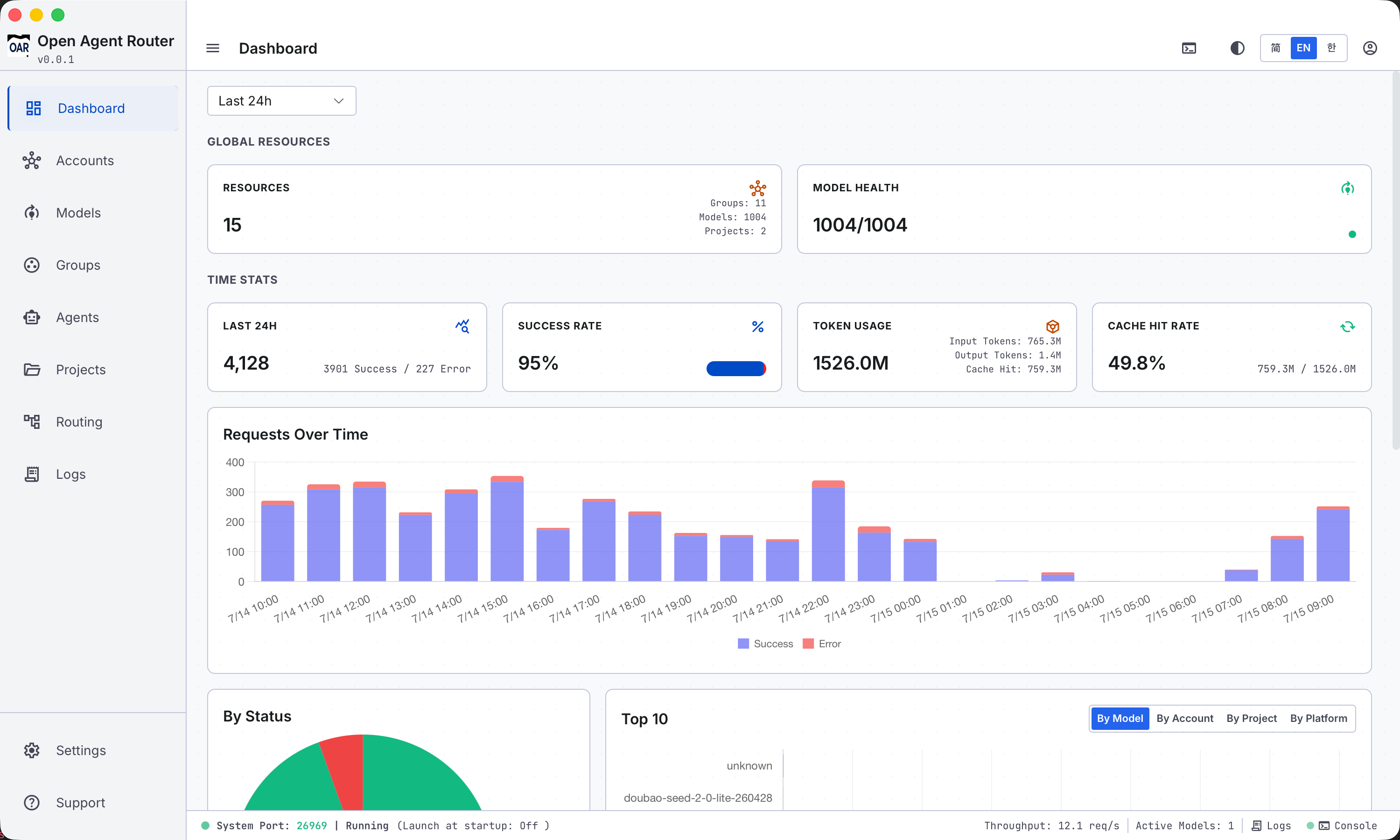
See it in action
A tour of the OAR desktop interface — manage everything from one dashboard.
// 05 — agents
Agent matrix
Point any of these agents at OAR and route through one local port.
Claude Code
- Protocol:
- Anthropic Messages
- Base URL:
- /agent/claude/v1/messages or /project/xxx/v1/messages
Claude Desktop
- Protocol:
- Anthropic Messages
- Base URL:
- /agent/claude-desktop/v1/messages or /project/xxx/v1/messages
OpenAI Codex
- Protocol:
- Codex Responses
- Base URL:
- /group/coding/v1/completions or /project/xxx/v1/completions
Hermes
- Protocol:
- OpenAI Chat Completions
- Base URL:
- /project/xxx/v1/chat/completions
OpenClaw
- Protocol:
- Custom
- Base URL:
- /project/xxx/v1/chat/completions
OpenAI SDK
- Protocol:
- OpenAI Chat Completions
- Base URL:
- /agent/hermes/v1/chat/completions
Gemini CLI
- Protocol:
- Google AI
- Base URL:
- /project/xxx/v1/models
OpenCode
- Protocol:
- OpenAI Chat Completions
- Base URL:
- /project/xxx/v1/chat/completions
Kimi Code
- Protocol:
- OpenAI Chat Completions
- Base URL:
- /project/xxx/v1/chat/completions
Qwen Code
- Protocol:
- OpenAI Chat Completions
- Base URL:
- /project/xxx/v1/chat/completions
GitHub Copilot CLI
- Protocol:
- OpenAI Chat Completions
- Base URL:
- /project/xxx/v1/chat/completions
// 06 — workflow
How a request flows
From inbound request to upstream forward in five steps.
Request inbound
Agent hits the local proxy port with a project / agent / group / model route.
Protocol detect
Path identifies the protocol: /v1/chat/completions = OpenAI, /v1/messages = Anthropic.
Model select
Memory cache resolves project → agent → group → model, applying alias mapping.
Protocol convert
If upstream protocol differs, OAR adapts — preferring vendor multi-protocol endpoints, falling back to adapter conversion.
Upstream forward
Keypool picks a key by weight; failure auto-switches. SSE streaming passes through untouched.
// 07 — quickstart
Up and running in 30 seconds
Download the desktop app, add keys and group models, bind a group to each agent — all in the dashboard.
Download the desktop app
Native installer for macOS, Windows and Linux. Auto-starts the local service on launch.
DownloadAdd accounts & build model groups
Paste API keys for DeepSeek / OpenAI / Anthropic / etc. Sync models, create a group, and add models with weights and cooldowns.
Bind a group to each agent
At the agent dimension, pick a group — or create a project and bind a group to the project + agent. OAR writes the agent configs for you — Claude Code, Codex, Hermes and more just work.
Ready to route every agent through one port?
Download the desktop client for macOS, Linux or Windows. Configure once, switch on the fly.